


 Compare Features LandingLanding page, 1 page
 Flowline SaaS LandingLanding page, 1 page
 Prismo Creative AgencyCreative, 1 page
 Velour Car DetailingLanding page, 1 page
Managing site activations
Each activated site uses one slot of your license. Here is how to see them and free one up.
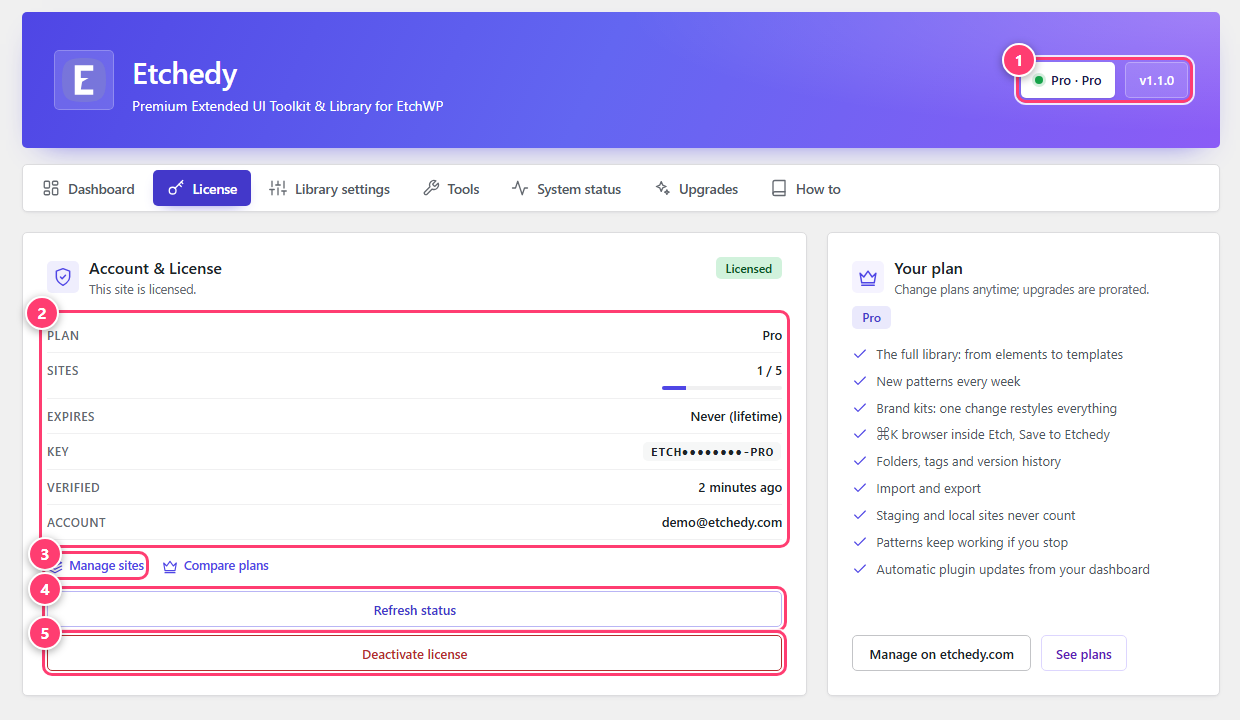
- Plan and the sites used out of your limit.
- Manage sites: open your account to see every site.
- Refresh status.
- Deactivate license.
See your sites
On the License tab, the Sites row shows used and limit, for example 1 / 5 for a five-site plan. Click Manage sites to open your account on etchedy.com and see every site that is using the license.
Free a slot
- On the site you are leavingOpen Etchedy → License and click Deactivate license.
- On the new siteInstall Etchedy, then activate the same key. The slot is used again.
If you can no longer reach the old site, use Manage sites to open your account and look at the sites using the license.
Seeing that all activations are in use?
That means your limit is full. Free one as above, or move to a plan with more sites under Etchedy → Upgrades.
Was this helpful?