


 Compare Features LandingLanding page, 1 page
 Flowline SaaS LandingLanding page, 1 page
 Prismo Creative AgencyCreative, 1 page
 Velour Car DetailingLanding page, 1 page
Suggest a website
Every website in the library started as a request. The Suggest a site card at the end of the Sites view opens a short form that goes straight to the people who build them.
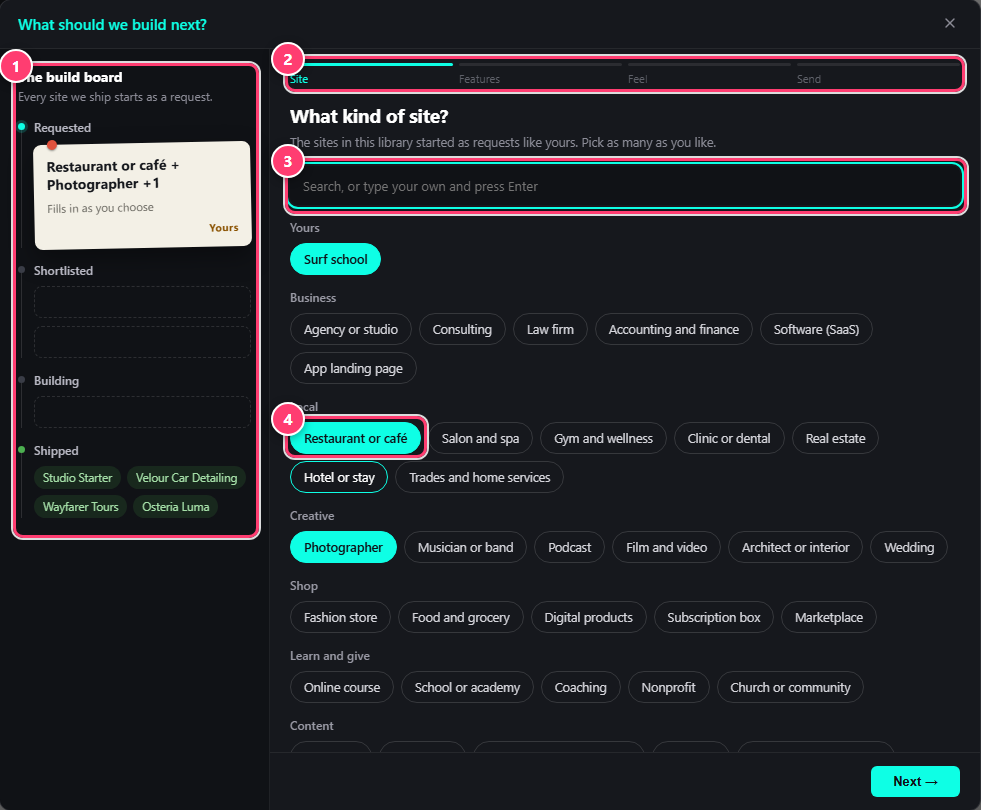
- The build board: what is requested, shortlisted, being built and shipped.
- Four short steps: Site, Features, Feel and Send.
- Search, or type your own kind of site and press Enter.
- Pick as many kinds of site as you like.
- SiteWhat kind of site? Pick as many as you like, from an agency or a restaurant to an online course, or type your own.
- FeaturesWhat it needs to do. Skip anything you do not need.
- FeelPick a mood and point us at a few sites you love. We look at every link.
- SendAnything we should know, in a few lines. Tick Email me the day a site like this ships to hear from us.
What we receive
Your request goes to the Etchedy team at [email protected], with your site address and plugin version so we can answer in context. Nothing else leaves your site.
Was this helpful?