


 Compare Features LandingLanding page, 1 page
 Flowline SaaS LandingLanding page, 1 page
 Prismo Creative AgencyCreative, 1 page
 Velour Car DetailingLanding page, 1 page
Tiers explained
Every item in the library belongs to one tier, which says what kind of thing it is. Inside a tier, items are grouped by category, which says what it is about. A card on etchedy.com shows both: the tier at the bottom (for example Layout) and the category at the top right (for example Hero).
The six tiers
- Layouts: sections and blocks. Full-width sections you stack to build a page: heroes, pricing sections, testimonials, headers, footers, FAQs and more.
- Elements: small UI pieces. Single building blocks such as buttons, badges, switches and tags.
- Components: interactive widgets. Parts with behaviour or repeating content: sliders, accordions, tabs, galleries, cards and team grids.
- Templates: full-page starters. Whole page designs, from the first section to the footer, to start a page from.
- Brand kits: a whole look. Colours, fonts, spacing, radius and buttons for Automatic.css, applied in one click. See Brand kits.
- Websites: complete sites. Pages, dynamic templates, post types, fields and forms, imported in one guided flow. See Import a ready-made website.
Brand kits open from the palette icon in the panel header. Sites have their own view in the panel menu; if you do not see it, switch Sites on under Library settings.
Show or hide a tier
You can hide any tier from the builder panel. Nothing is deleted, it just stops showing up. Go to Etchedy → Library settings and use the switches under Library sections. See Library settings.
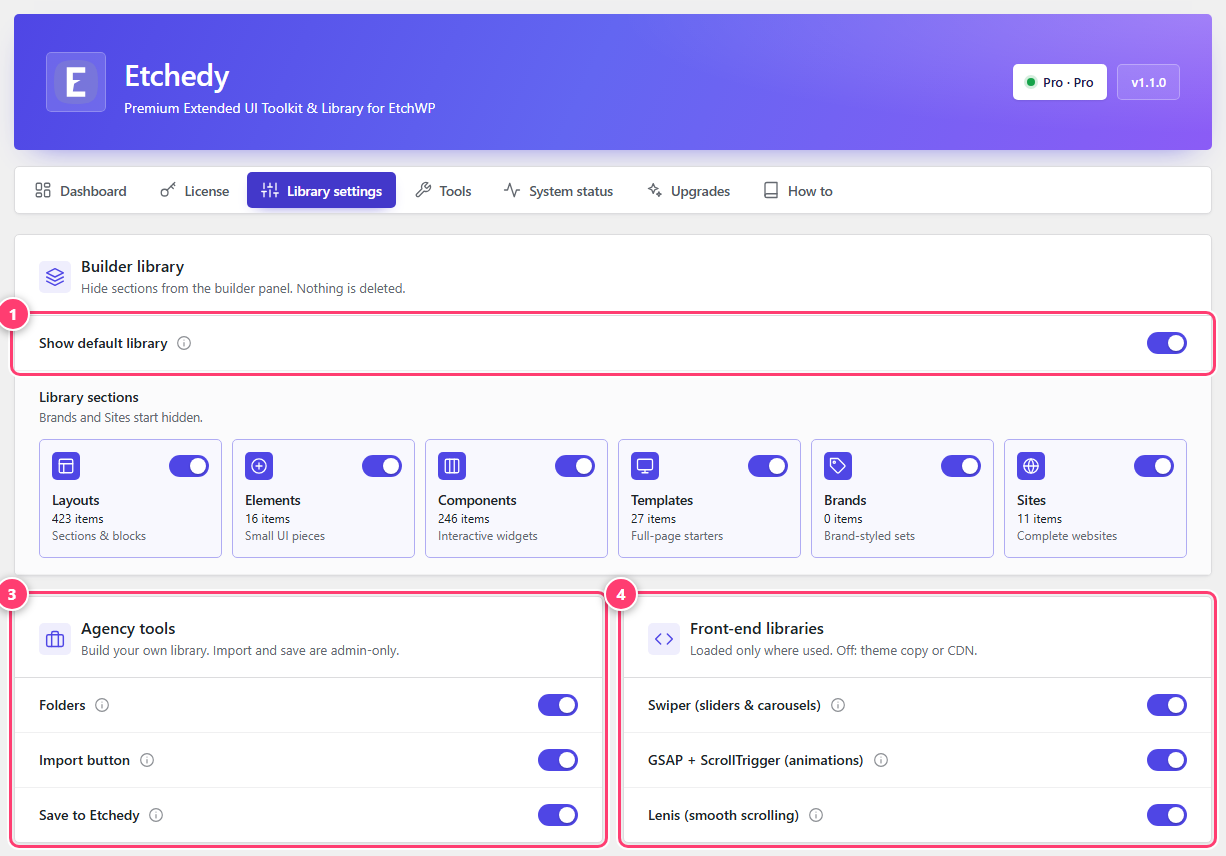
- Show default library: turn the whole built-in library on or off.
- One switch per tier, with its item count and a short description.
- Agency tools: folders, import and Save to Etchedy.
- Front-end libraries: Swiper, GSAP and Lenis.
Categories
Categories are what you browse in the tree and filter on etchedy.com. Layouts have the most, such as Hero, Features, Testimonials, Pricing, Headers, Footers and FAQ. Components include Cards, Tabs, Accordions, Galleries and Sliders. Elements include Buttons, Badges and Tooltips. The list grows as new patterns ship.