


 Compare Features LandingLanding page, 1 page
 Flowline SaaS LandingLanding page, 1 page
 Prismo Creative AgencyCreative, 1 page
 Velour Car DetailingLanding page, 1 page
Install Etchedy
Etchedy is a WordPress plugin that adds a library of ready-made patterns to the EtchWP builder. Installing it takes about two minutes.
What you need
Etchedy sits on top of EtchWP, so check these first:
- WordPress 5.9 or newer and PHP 8.1 or newer.
- EtchWP (the Etch plugin) installed and active. Etchedy does not bundle it. If Etch is missing or switched off, Etchedy will not show its button in the builder.
- Automatic.css (ACSS) is recommended, not required. Every pattern reads your ACSS tokens, and falls back to sensible values when ACSS is not there.
Install the plugin
- Open Plugins, then Add NewIn your WordPress admin, go to Plugins → Add New Plugin.
- Upload the zipClick Upload Plugin, choose the Etchedy zip you downloaded and click Install Now.
- ActivateClick Activate Plugin. An Etchedy item appears in the admin menu.
Free zip or Pro zip?
The free download includes the free patterns, and shows the Pro patterns as locked previews. The Pro download includes the whole library, and Pro patterns unlock once you activate a license key. Same plugin either way.
What you see after activating
Open Etchedy in the admin menu. You land on the Dashboard, which shows your plan, the installed version and how many items are in the library.
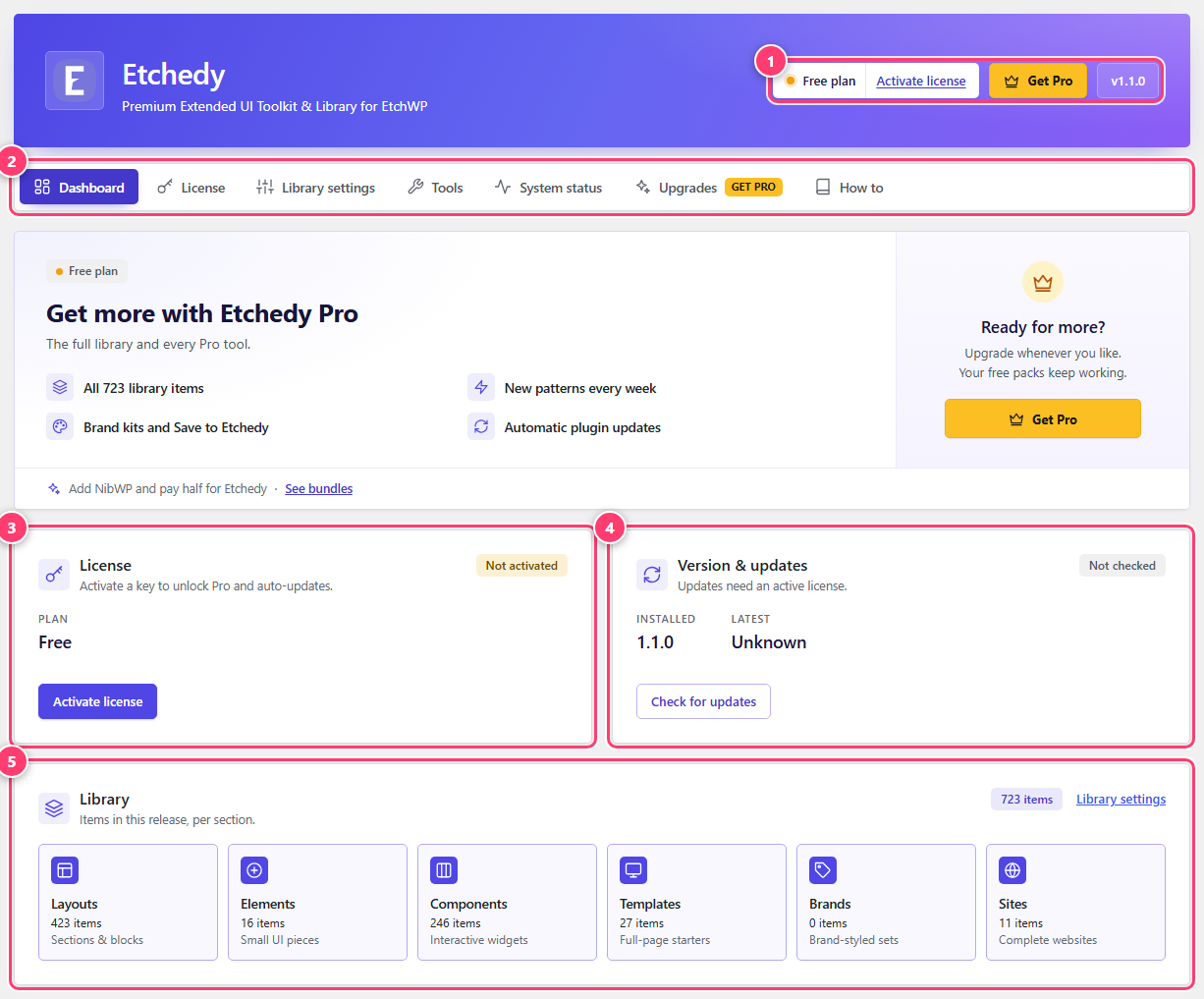
- The plan badge, version and (on the free plan) the Activate license and Get Pro buttons.
- The section tabs: Dashboard, License, Library settings, Tools, System status, Upgrades and How to.
- License card: your plan and the Activate license button.
- Version and updates: what is installed, and a button to check for updates.
- Library: how many items ship in this release, per section.
Next step: activate your license if you have a key, or go straight to opening the library in Etch to start with the free patterns.
Was this helpful?