


 Compare Features LandingLanding page, 1 page
 Flowline SaaS LandingLanding page, 1 page
 Prismo Creative AgencyCreative, 1 page
 Velour Car DetailingLanding page, 1 page
Import, steps 3 and 4: brand and content
Step 3: Brand
Make the website yours before it lands:
- Site name and tagline. The name also replaces the demo brand name in the header and footer.
- Logo. PNG, JPG, SVG or WebP, under 5 MB. It is uploaded to your media library when the import starts.
Leave a field empty to keep what your site has now.
Step 4: Content
Choose what to import and how it should arrive.
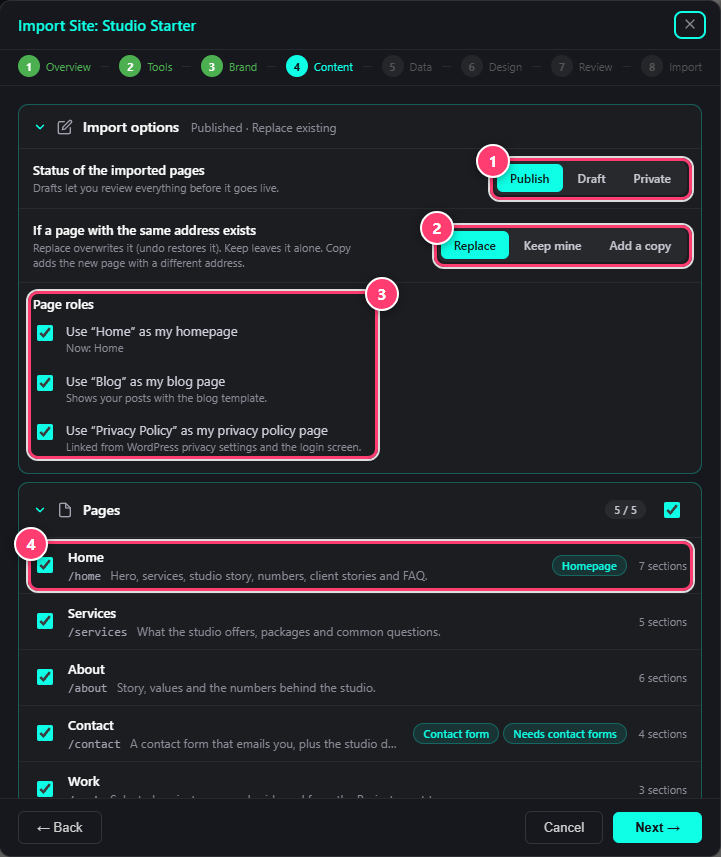
- Status of the imported pages: Publish, Draft or Private.
- When a page with the same address exists: Replace, Keep mine or Add a copy.
- Page roles: your homepage, blog page and privacy page.
- Each page with its address, what it holds and its number of sections.
- Status. Import pages as Publish, Draft or Private. Drafts let you review everything before it goes live.
- Same address. If you already have a page at the same address, Replace overwrites it (undo restores it), Keep mine leaves it alone and Add a copy imports the new page under a different address.
- Page roles. Use the site’s Home as your homepage, its Blog as your posts page and its Privacy Policy as your privacy page. Untick any you want to keep as they are.
- Pages, templates and demo content. Tick what you want. Badges show which page is the homepage and which pages carry a form.
Next
Continue with steps 5 and 6: data and design.
Was this helpful?